NeolemonNeolemonvsAdobe FireflyAdobe Firefly

The same cartoon character on every page.

Adobe Firefly is a whole creative-AI studio: image, video, audio, vector, partner models, the lot. Neolemon does one job. It keeps your cartoon hero recognisable across a 32-page book, which is the part that usually breaks.

20 free credits. No card required.

4.5
Trustpilot, 94% 5-star
1M+
uses on our GPT
60%
publish to KDP
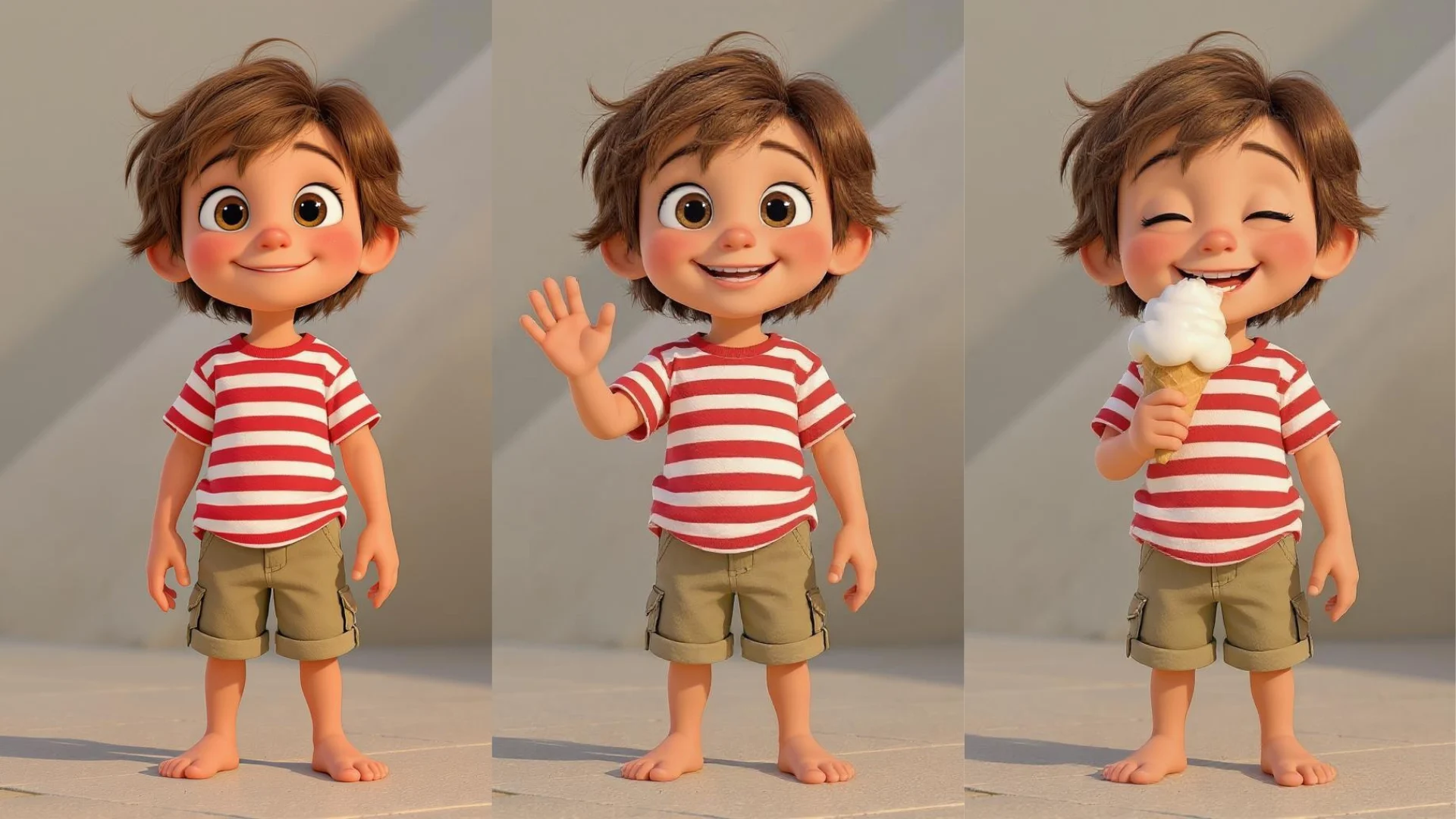
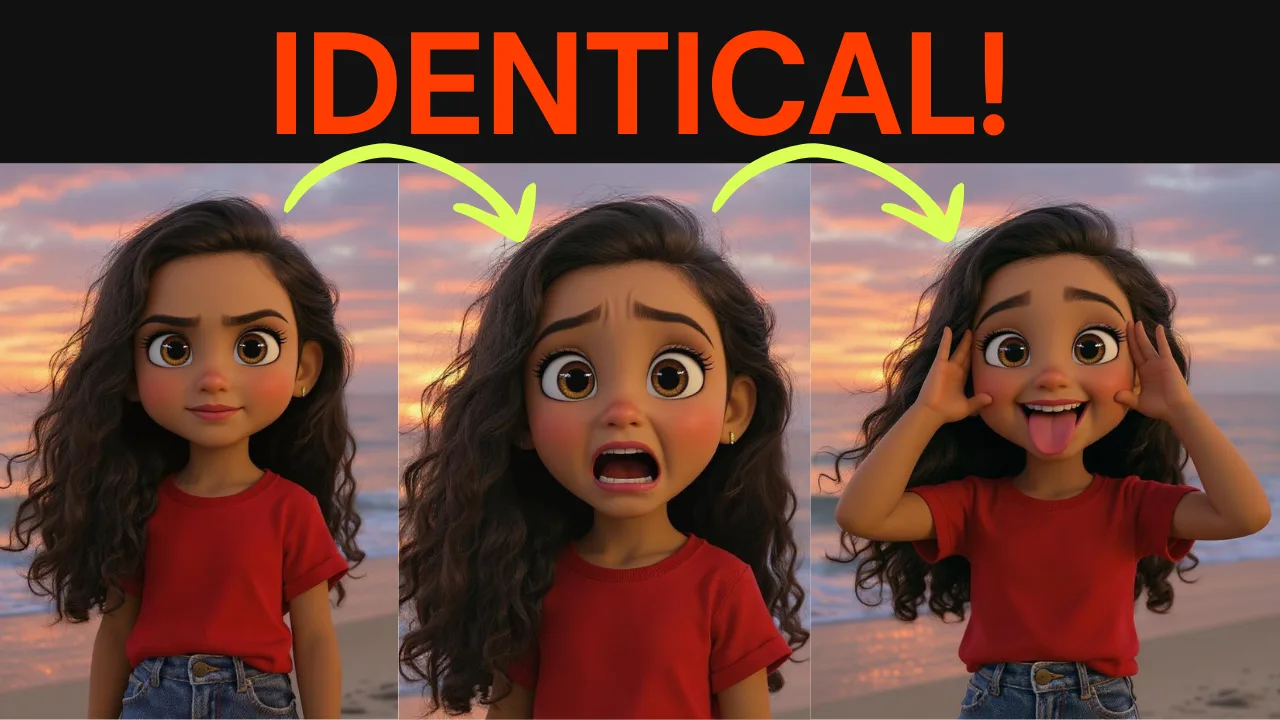
The same cartoon character generated in several poses with an identical face, hair, and outfit

One character. Many scenes. Zero drift.

The short answer

Who each one is for.

I co-founded Neolemon, so I'm biased and I'll own it. I also use Firefly. Here's the honest split before any of the detail. If Firefly is right for your project, I'd rather you pick it than churn off mine in week two.

Adobe Firefly

Choose Adobe Firefly

You want a broad creative-AI suite: image, video, audio, vector, generative fill, custom models, partner-model variety, Photoshop and Premiere integration, and Adobe's commercial-safety story.

Choose Neolemon

Your real job is keeping the same cartoon character on-model across a children's book, comic, classroom story, or social series, without assembling a Firefly plus Boards plus Custom Models plus Photoshop workflow yourself.

Use both

Keep Firefly for finishing in Photoshop, photoreal, video, and vectors. Use Neolemon for the brittle middle step: producing the same cartoon character across every scene.

The whole comparison in one line

Firefly gives you a creative operating system. Neolemon gives you a route.

Most "Adobe Firefly alternative" pages pretend Adobe is a sleepy giant that lost the AI race. It didn't. Firefly is an enormous multi-model creative studio inside Photoshop, Illustrator, and Premiere, with partner models from Google, OpenAI, Runway, and more. We don't beat that on breadth. We beat it on one narrow job.

Prompts like "keep identical facial features" don't guarantee the same identity across multiple generated images or frames.
An Adobe community manager, answering a storybook author on the Adobe Community. That drift is the exact problem we built the whole product around.

What you're comparing

A giant suite, and a focused tool.

Older "alternative" pages still call Firefly "Adobe's text-to-image tool." That's three years out of date. Here's precisely what each one is, as of 2026.

Adobe Firefly

Adobe Firefly

A creative-AI suite, four layers

  • The standalone app. A web and mobile studio for images, video, audio, vectors, boards, and design assets, with Adobe and partner models in one place.
  • Inside Creative Cloud. Firefly powers Generative Fill, Expand, and Generate features in Photoshop, Illustrator, Premiere, Lightroom, and Express.
  • A model router. Adobe's own models plus partner models from OpenAI, Google, Runway, Luma, Black Forest Labs, Ideogram, Kling, and others, picked from dropdowns.
  • Enterprise infrastructure. Firefly Services APIs, Foundry, GenStudio, Custom Models, brand checks, and ad-channel activation.

Worth knowing: Firefly Image Model 5 generates 4MP native output with photorealistic detail and lifelike portraits, and prompt-to-edit works across Adobe and partner models. Adobe reported $26.06B total ARR in Q1 FY2026 and said AI-first ARR more than tripled year over year. This is not a side experiment. It's the company's bet.

Neolemon

Neolemon

A character workshop, on purpose narrow

Formerly ConsistentCharacter.ai. Two founders, bootstrapped, in Faro, Portugal. No venture money, no ads. We do one job: keep the same cartoon character recognisable across poses, expressions, outfits, scenes, and full story sequences.

  • Character Turbo builds the anchor from structured Description, Action, Background, and Style fields.
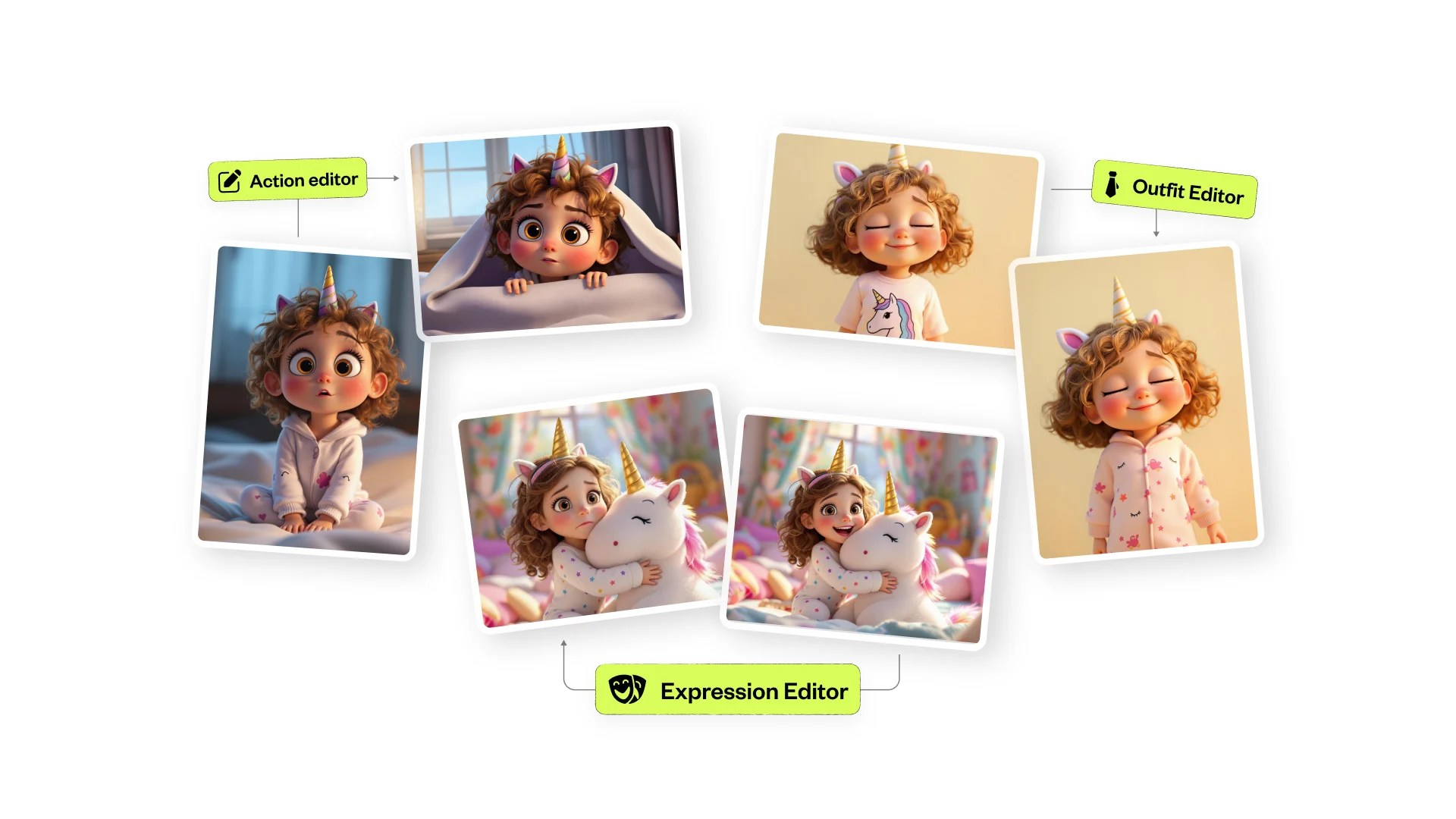
  • Action, Expression, Perspective, Outfit editors change one variable at a time with identity locked.
  • Multi Character and Story Scene Pro compose up to three characters with a background reference.
  • AI Canvas, Coloring Book Creator, Storyboard, PDF export take you from assets to a laid-out book.
Neolemon editors generating the same character in different poses and outfits

We deliberately deprecated photorealistic styles in 2025 to specialise in cartoon storytelling. We are smaller than Adobe by a factor I won't dignify by writing out. That's part of why we beat them on the narrow job, and a real reason you might still pick them.

How consistency actually works

Lock the face. Change one thing at a time.

A text-to-image model doesn't remember your character between generations. Each image is a fresh roll of the dice, so the hair, face, and outfit drift. Firefly can fight that with references and a trained Custom Model. Neolemon makes "stable identity, one varying element" the whole workflow.

1

Anchor

One clean front view of your character in Character Turbo. Every scene derives from this single reference.

2

Pose it

Action Editor changes the pose, "walking and waving" or "sitting and reading." Face, outfit, and style hold.

3

Emote it

Expression Editor moves the eyes, brows, and mouth. Same child, twelve different feelings.

4

Compose it

Drop the character into a background, or compose up to three with Story Scene Pro. No identity blending.

The same cartoon character shown in several expressions, staying on-model

Why it holds where general tools drift

The failure mode is rarely page one. It's page 27, after your character has been regenerated into thirty new situations and quietly stopped being the same kid. Neolemon conditions every image on your one anchor and changes a single variable per edit, so the face you signed off on page 1 is the face on page 32.

You can hear the gap in Firefly's own forums. One author with ten characters was pointed to Firefly Boards and still said he was "struggling" once two consistent characters had to share one image. Another visual designer storyboarded a TV commercial in Firefly, got a different face in every scene with the same prompt, and went back to a drawing tablet. The Custom Models path can fix this for power users with the time and training images. For a solo author with a manuscript, the path is steeper than the work needs to be.

The part Adobe's pricing page doesn't shout

Firefly's credit model, made legible.

Firefly isn't priced per image or per project. It's priced per credit, and the credit cost swings wildly by model, resolution, and feature. Standard image features like Generative Fill are unlimited. The meter starts the moment you touch a partner model, video, audio, or a Custom Model.

Adobe's "up to 20 five-second videos" claim

~4

of those videos are at 1080p on Firefly Standard. At 1080p a 5-second clip is 500 credits, so 2,000 credits buys roughly four, not twenty. "Up to" is doing the heavy lifting.

Training one character Custom Model

500

credits before you generate a single image, then 20 credits per generation. On Standard that's a quarter of your monthly allowance gone to setup.

Credits at the end of the month

Gone

Premium credits don't roll over. Episodic creators who work in bursts can leave a lot on the table every cycle.

What a premium generation actually costs, from Adobe's own rate card

Model or action Adobe-listed credit cost Roughly, at about $0.005 per credit
Google Nano Banana image10 / generation~$0.05
Ideogram 3.0 image20 / generation~$0.10
Google Nano Banana Pro image40 / generation~$0.20
OpenAI GPT Image60 / generation~$0.30
Firefly Custom Model, one training run500 / training~$2.50
Firefly video, 1080p / 24fps100 / second~$2.50 for 5 sec
Google Veo 3.150 / second~$1.25 for 5 sec
Sora 2 Pro90 / second~$2.25 for 5 sec
Luma Ray3 HDR 4K video450 / second~$11.25 for 5 sec

Credit costs from Adobe's Generative Credits FAQ and Partner Models page. Adobe ships changes regularly, so re-check before budgeting. The dollar column is a rough guide, not an Adobe figure.

Neolemon's math is dumber on purpose

One number: Character Turbo is 4 credits an image. The Creator Plan is $29 a month for 600 credits, about 150 generations. You can tell a co-author "this book will cost roughly $X" before you start, without knowing whether you'll reach for Nano Banana Pro or GPT Image or Image Model 5 this week. This isn't "we're cheaper." Firefly Standard at $9.99 is cheaper at the front door. It's "we're easier to forecast for a known job."

Pricing

One is a tasting menu. One is a flat fee.

Firefly Standard is genuinely cheaper to start, and if you already pay for Creative Cloud Pro you may have premium credits already. The real cost depends on what you generate. Here's both sides with the fine print.

Adobe Firefly, US individual list

PlanPer monthPremium credits
Standard$9.992,000
Pro$19.994,000
Pro Plus$49.9910,000
Premium$199.9950,000
  • Standard image features like Generative Fill are unlimited. That part is real and generous.
  • Premium credits don't roll over. Use them this cycle or lose them.
  • Most Creative Cloud single-app plans bought after June 2025 include only 25 premium credits, not the 500 earlier subscribers had.
  • The current "unlimited" promo runs on select models for up to a year, on Firefly's own surfaces only, then reverts to credits.

Neolemon

$29 / month, flat

600 credits, about 150 generations. Plus a free trial: 20 credits, no card.

  • One tier. No token system, no partner-model exception footnotes.
  • Character Turbo is 4 credits an image, so the math is the same every week.
  • Commercial-use rights included on the paid plan.
  • We bumped credits from 400 to 500 to 600 at the same $29 during our rebrand.
See Neolemon pricing

For broad ideation, Firefly Standard is the calmer spend. For Adobe-native workflows, Firefly Pro or Creative Cloud Pro. For shipping a specific cartoon-story project, Neolemon is the calmer math. Don't compare sticker prices, compare how many usable final scenes you have after the revisions.

Feature by feature

The full comparison.

Grouped by what you're actually deciding on. Where Firefly is the stronger pick, it says so plainly. There are plenty of those rows.

Capability Adobe Firefly Neolemon
Cartoon character consistency
Same character across a storyPossible via references plus a trained Custom Model, workflow you assembleThe core product: anchor plus editors
Pose and actionComposition and structure referenceDedicated Action Editor
Facial expressionImage guidance, inpainting, Generative FillDedicated Expression Editor
Outfit and camera angleGenerative Fill and image guidanceOutfit and Perspective Editors
Two-character scenePossible via references and BoardsMulti Character V1 and V2, @character tagging
Three characters plus backgroundBoards plus multi-reference workflowStory Scene Pro, iteration still needed
Breadth and ecosystem
Photorealistic humansYes, Image Model 5 and partner modelsNo, cartoon-only since 2025
AI video generationFirefly video, Veo, Sora, Kling, Luma, RunwayNo, hand off to Higgsfield, Runway, Kling
AI audio, translation, lip syncYes, broad audio surfaceNo
Vector generationYes, text-to-vectorNo
Generative fill and expandBest-in-class, inside PhotoshopNo, generation-first not edit-first
Partner model accessOpenAI, Google, Runway, Luma, Kling, Flux, moreNone, single guided workflow
Adobe Creative Cloud integrationPhotoshop, Illustrator, Premiere, ExpressNone
Custom-trained modelsYes, 10 to 30 image datasetNo customer-facing training
Book and KDP production
Storyboard and page sequencingFirefly Boards, moodboarding and explorationStoryboard View, panels, script, PDF export
Drag-and-drop scene compositionPhotoshop, Express, InDesign, separate appsNative AI Canvas with text overlays
KDP coloring-book pagesPossible via generationColoring Book Creator, one click
Photo to cartoon avatarPossible via image-to-imageDedicated Photo to Cartoon
Pricing, rights, and trust
Lowest paid tier$9.99 a month, Standard$29 a month, flat
Pricing modelCredits, variable per model and resolutionFixed, 4 credits per Character Turbo image
Free way to tryLimited free credits, standard features unlimited on paid plans20 credits, no card
API and automationFirefly Services APIs, enterpriseSegmind V3 endpoint, narrower
Commercial-use rightsYes, plus IP indemnification on eligible enterprise surfacesYes, on the paid plan
Content CredentialsYes, attached to certain exportsNo
Enterprise governanceGenStudio, Foundry, Firefly ServicesNone

Firefly numbers from Adobe's public pricing, help center, and partner-model pages. Adobe ships pricing and model changes regularly, so check Adobe's plans page before you buy.

Proof, with names

What people actually ship and say.

Most comparison pages skip this because they don't have it. Here are both sides, real names and real public sources, the praise and the brutal.

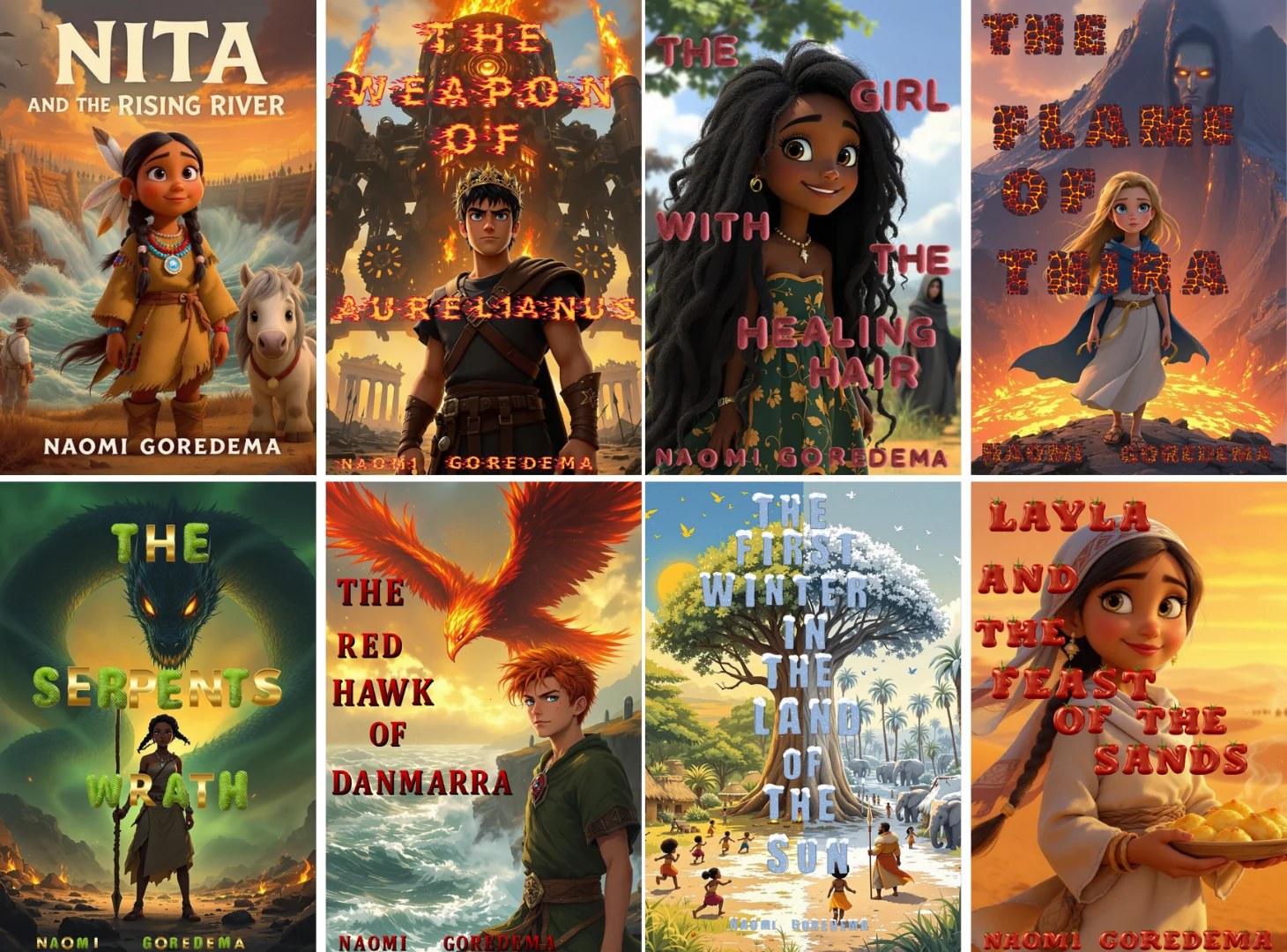
Finished children's book covers illustrated with Neolemon by author Naomi Goredema
20 books in 4 months. Naomi Goredema, children's author. Her old workflow, InDesign plus Photoshop plus Midjourney, took about three days per character.

On Adobe Firefly

Firefly's reviews aren't bad. G2 shows 4.4 across 336 reviews. The praise is real, and so is the pain, which clusters in specific places.

The "seamless integration" makes it work inside an existing Adobe stack.

Arkajit D., CTO, on G2

Firefly can "lack precision" in hands, text positioning, and proportions.

Arushi B., UI/UX designer, on G2

The "lack of output control" makes it hard to produce consistent assets.

Sushant R., thumbnail designer, on G2

Credit and frame counting is brutal and not obvious enough up front, which makes competitors feel more transparent.

a reviewer, on r/Adobe

The pattern isn't "Firefly is bad." It's prompt drift on hands, faces, and text, aspect-ratio control, settings transparency, and credit anxiety when an output misses. Those are exactly the places a focused tool can help.

On Neolemon

Our proof is finished work, not tool reviews.

  • Patricia Wonsey, a former teacher, made over $1,000 in her first week selling coloring-book projects built on Neolemon.
  • Brian McPhee shipped an 83-page book with 47 illustrations, 13 characters, and 12 stories.
  • Erica Weinstein built an 8-scene rom-com storyboard with the same cast across every scene.
  • Brian Weiss took Neolemon characters into the Stuffies Storybook iPad app.
  • "This app has become an invaluable tool in my creative process." Joanne Mohammed, children's author, on LinkedIn.
4.5★★★★★34 reviews, 94% 5-star on Trustpilot

Credit where it's due

Where Adobe Firefly wins.

I'll go first, because if I listed our wins first you'd suspect the rest of the page. These are genuine, and if one is what your project needs, Firefly is the right tool.

The Creative Cloud moat

If your pipeline ends in Photoshop, Illustrator, or InDesign, Firefly is where the final work already happens. That's Adobe's single biggest advantage.

Multimodal breadth

Image, video, audio, vector, design, boards. One platform that touches all of them. We touch one.

Yes, it can do consistency

A well-trained Custom Model on 10 to 30 images can hold a specific character. You assemble the workflow, but the capability is real.

Commercial-safety posture

A licensed-and-public-domain training story, Content Credentials, and conditional IP indemnification for eligible enterprise customers. Built for procurement.

Multi-model access

Nano Banana, GPT Image, Veo, Sora, Kling, Flux, Ideogram, all switchable inside one app. We don't do this at all.

Photoreal and ads

Author portraits, product shots, cinematic mockups, fine art. We point people to Firefly or Midjourney for photoreal humans.

Generative fill and edit

Extend an image, remove an object, edit by prompt while preserving the subject. Firefly inside Photoshop is the right tool for that.

A cheaper front door

$9.99 Standard beats our $29, and Creative Cloud Pro credits can make ideation effectively free. We won't pretend otherwise.

Enterprise scale

GenStudio, Foundry, ad-channel activation, thousands of governed on-brand variations. A billion-dollar company is behind it.

If any of those is your deciding factor, stay on Firefly and build something good. The customers we want are the ones for whom the narrow workflow is genuinely better.

Our turn, same rules

Where Neolemon wins.

Cartoon-only, on purpose. Built around the one job that breaks general image tools for storytellers.

Consistency is the product

Not a feature bolted onto a suite. The whole product architecture is the character-consistency workflow.

No model decisions per page

No "which model, which reference type, do I train a Custom Model." You create the character once and change one variable at a time.

Expression and action first-class

Children's books are emotional beats: worried, proud, sleepy, scared. Named editors map straight to the story-writing problem.

A real storybook layer

Projects, Storyboard View, PDF export, AI Canvas, Coloring Book Creator. The layer above per-image generation that authors actually need.

Beginner-friendly by design

Prompt Easy turns rough text into a structured prompt. No learning what "style reference strength" means before you're productive.

Money you can forecast

4 credits an image, flat $29, no per-model exception footnotes. You can budget a whole book before you start.

Coloring books for KDP

Any image becomes a print-ready coloring page in one click, a high-volume KDP category.

Real KDP outcomes

Named authors who shipped books, not stock testimonials. Roughly 60% of our users publish to KDP.

Honest about its limits

Cartoon-only, no video, no native print, three-plus characters still iterate. We say so up front. You'd rather hear it now.

Route yourself

Who should pick which.

Adobe Firefly

  • You already live in Photoshop, Illustrator, Premiere, or Express.
  • You need photoreal humans, video, audio, or vector in one place.
  • You're a brand or agency needing custom models and enterprise governance.
  • You need IP indemnification on paper for procurement.
  • You want generative fill, expand, or prompt-to-edit on existing images.

Neolemon

  • You're illustrating a children's book with the same character across 24 to 32 pages.
  • You self-publish on Amazon KDP, or you're about to.
  • You've hit "the character keeps drifting" on Firefly or a generalist tool.
  • You want simple credit math you can budget for a specific project.
  • You'd rather have one guided workflow than thirty model knobs.

Use both

  • Neolemon for the consistent cartoon scenes in the middle.
  • Firefly inside Photoshop for retouching and finishing.
  • Firefly for the photoreal cover portrait, vectors, or a video teaser.

Test it before you pay

The five-prompt stress test.

Don't take my word for it, and don't take Adobe's. Run the same five prompts on each tool with the same character, score the outputs, and decide on evidence. It takes about 30 minutes per tool.

1

Front view

Full body, neutral pose, your target style. The anchor. If this misses, nothing else lands.

2

Side profile

Same character walking, side view. Tests whether identity survives a camera-angle change.

3

New pose

Sitting and reading, same outfit. Tests whether the model locks onto pose rather than identity.

4

Close-up

Head and shoulders, surprised expression. Tests expression control and face stability.

5

Two characters

Your hero with a second character in a simple scene. Where most tools break, per Adobe's own forums.

Score each result on five things

  • Facial identity: does the face look like the same person across all five?
  • Outfit consistency: same shirt, same colours, same details?
  • Art style: same line weight, shading, and overall feel?
  • Anatomy: hands, fingers, limbs, proportions reasonable?
  • Multi-character discipline: when there are two, do both stay on-model?

Then total the credits each tool burned and compare the wins-per-iteration ratio. Whichever needs fewer retries to get all five to a usable place is your tool. That number is the only one that matters for a real book.

Don't compare Firefly's best-ever generation to Neolemon's first. Run the same five prompts side by side. I'd rather lose to evidence than win to fluff.

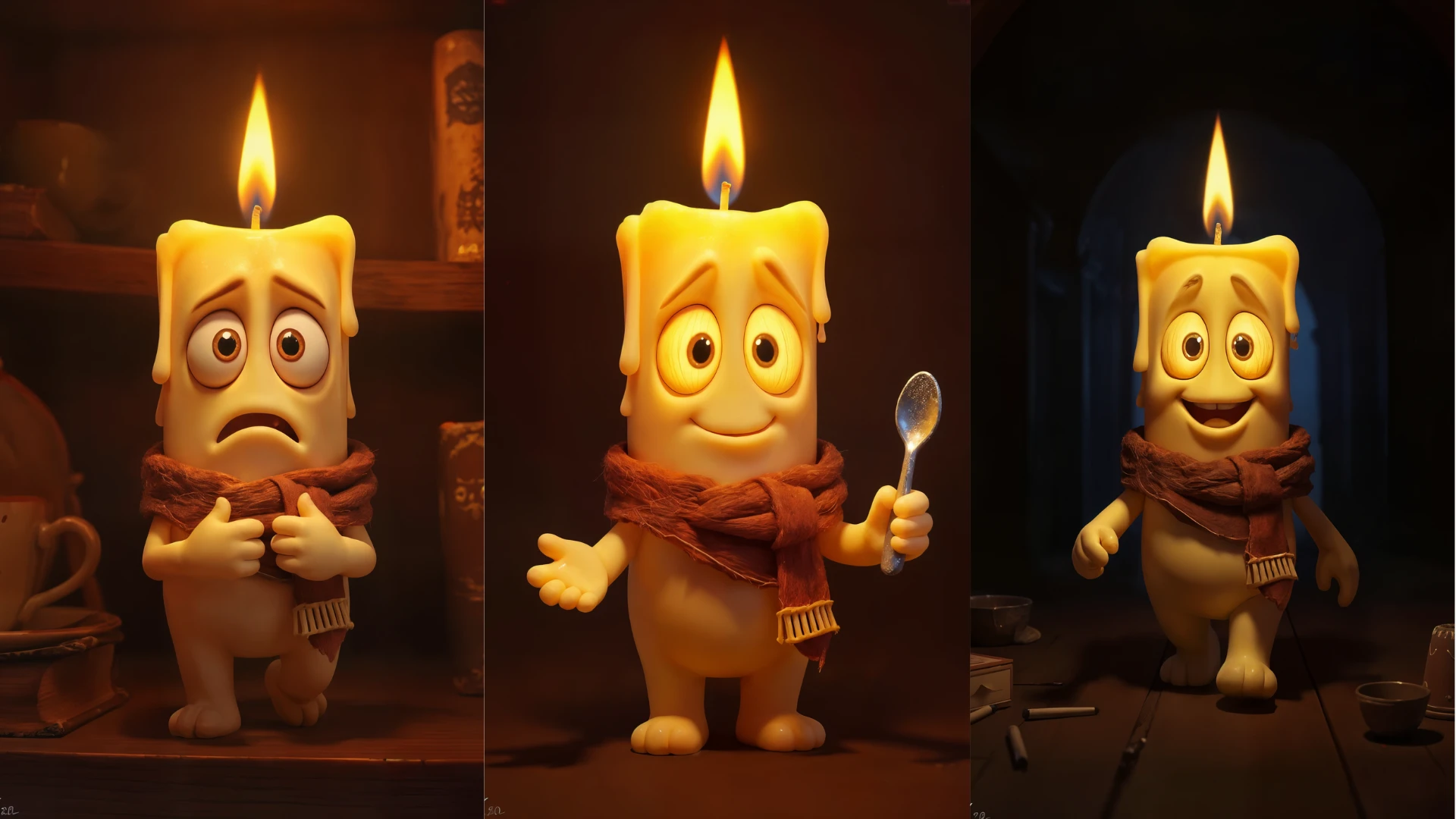
A range of consistent cartoon styles generated in Neolemon

The switch

Moving a character from Firefly to Neolemon.

Hit the wall on character drift, or tired of the credit math? Here's the 10-minute path. You can keep your Adobe subscription and keep finishing in Photoshop.

  1. 1

    Export your cleanest Firefly character

    Full body, front-facing, neutral pose, clean background. The one Firefly got most on-model.

  2. 2

    Start a free trial

    20 credits, no card. Enough to reach a working character.

  3. 3

    Drop it into Photo to Cartoon

    Or use Prompt Easy to generate a structured prompt describing your character.

  4. 4

    Re-anchor in Character Turbo

    This regenerates the character through our consistency pipeline, so future scenes derive from a stable native reference.

  5. 5

    Build a pose pack

    Five to ten poses with Action Editor. Face and outfit stay locked.

  6. 6

    Build an expression pack

    Five to ten emotional beats with Expression Editor. Same child, every feeling.

  7. 7

    Compose your scenes

    Multi Character or Story Scene Pro for one to three characters with a background.

  8. 8

    Organize in Projects

    One project per book. Sequence panels in Storyboard, write the script alongside.

  9. 9

    Lay it out and publish

    The storyboard PDF isn't a print interior. Finish at 300 DPI, then upload to KDP and disclose AI images, which KDP requires.

No half-truths

What to watch out for, on both sides.

Adobe Firefly

  • Premium credits don't roll over, and the per-model cost varies a lot.
  • Most Creative Cloud plans don't include premium Firefly features. "I already pay Adobe" is not the same as having premium capacity.
  • Real users report prompt drift on hands, faces, and text, and limited aspect-ratio control.
  • Character consistency in the standard flow takes assembly: references, training, concept prompting.
  • An annual-billed-monthly plan can charge 50% of the remaining term if cancelled after 14 days. Check which plan you're on.
  • In March 2026 Adobe agreed to a $150M settlement of a US lawsuit over termination fees and cancellations. Adobe denied wrongdoing.

Neolemon

  • Cartoon-only since 2025. For photoreal humans, Firefly, Midjourney, or Flux is the right tool.
  • Three or more characters in one frame still need iteration.
  • Not an animation studio. Pair with Higgsfield, Runway, or Kling for motion.
  • The storyboard PDF is a storyboard, not a print-ready KDP interior.
  • Commercial-use rights aren't copyright ownership. The law is still evolving for AI work.
  • KDP requires AI disclosure regardless of which tool made the images.

I'd rather you read this and stay on Firefly than convert, churn, and write us a bad review.

Questions

What authors ask before switching.

What's the best Adobe Firefly alternative for consistent characters?+

If your problem is keeping one cartoon character recognisable across many story scenes, Neolemon is built for that exact job. Its Action, Expression, Perspective, and Outfit editors give you scene-by-scene control around a single anchor image. For photorealistic or semi-realistic books, Firefly itself or Midjourney is the stronger pick. For text-heavy cover design, reach for Ideogram or Firefly with structure reference.

Can Adobe Firefly create consistent characters?+

Yes, with caveats. Firefly has Style Reference, Composition Reference, Firefly Boards, and Custom Models. Adobe's docs say you can train a character model from 10 to 30 images and use it to produce a specific character across scenes. What it doesn't have is a workflow built around "produce the same character across a 32-page book" without training, captioning, and concept prompting. You can get there, but you assemble the path yourself.

Why do my Adobe Firefly characters keep drifting between scenes?+

This is the most common complaint in Adobe Community character-consistency threads. Three reasons: generation is probabilistic by default, Style and Composition Reference constrain but don't create persistent character memory, and small prompt changes can drift the face or outfit. The fix is a stable anchor plus changing one variable at a time, which is exactly what Neolemon's editors enforce. Firefly can get there too by training a Custom Model, but the path is steeper for a solo author.

Do I need Firefly Custom Models to make consistent characters?+

For a single book, probably not. Training a Custom Model on 10 to 30 images, managing tags and captions, and learning concept prompting often outweighs the consistency gain. Reference-based workflows, or Neolemon's anchor-plus-editor pipeline, are the more practical path. Custom Models become worth it when you have a recurring brand mascot you'll use for years, a clean asset library, and the right Adobe entitlement.

Is Firefly Standard at $9.99 cheaper than Neolemon?+

At the front door, yes. $9.99 beats our $29, and if you already have Creative Cloud Pro your premium credits may make ideation effectively free. The catch is what credits buy: a 1080p 5-second video is 500 credits, training a Custom Model is 500, and premium credits don't roll over. Neolemon is one flat number you can forecast for a known job. Compare usable final scenes after revisions, not sticker prices.

I already pay for Creative Cloud, why does Firefly want more money?+

Most Creative Cloud plans don't include premium Firefly features. Eligible plans include Firefly plans, Creative Cloud Pro and Pro Plus, Express Premium, and some others. Creative Cloud single-app subscribers who signed up on or after June 17, 2025 get 25 premium credits a month, not the 500 earlier subscribers had. Check which plan you're on before assuming Firefly is free with your Adobe subscription.

Does Neolemon generate video like Adobe Firefly?+

No. We make consistent frames. You take those frames into Higgsfield, Runway, Kling, or CapCut for motion. If in-platform video matters, Firefly's access to Veo, Sora, Kling, Luma, and Runway is a clean Firefly win.

Are Adobe Firefly outputs commercial-safe?+

Adobe positions Firefly as commercially safe. Its initial commercial model was trained on licensed content and public-domain material, and Adobe says non-beta Firefly outputs can be used commercially. Eligible enterprise customers can receive IP indemnification for certain workflows. Partner models come with extra user-responsibility caveats, and supplemental coverage for them is conditional and excludes beta releases. This is one of Firefly's genuine strengths, and we don't try to match Adobe's legal infrastructure.

Can I use Neolemon for KDP children's books?+

Yes, that's the primary use case. Roughly 60% of our users publish to KDP. One caveat that applies to both tools: Amazon KDP requires authors to disclose AI-generated images. Our storyboard PDF export is a storyboard, not a print-ready interior, so final print specs, 300 DPI, bleed, embedded fonts, still need separate handling.

Is the Neolemon Creator Plan really $29 a month for 600 credits?+

Yes. We bumped credits from 400 to 500 to 600 at the same $29 during our rebrand from ConsistentCharacter.ai to Neolemon. Character Turbo is 4 credits an image, so about 150 generations a month. The free trial gives 20 credits and doesn't require a card.

Can I copyright AI-generated children's-book illustrations?+

This is genuinely complicated and out of scope for any tool's marketing page to settle for you. Commercial-use rights from a tool, Firefly or Neolemon, are not the same as copyright ownership. The US Copyright Office's 2025 guidance says outputs can be protected only where a human author determines sufficient expressive elements, not from prompting alone. Talk to a publishing lawyer or check current Copyright Office guidance before registering a book.

Will my Adobe credits work in Neolemon?+

No, they're separate platforms with separate billing. Your Adobe account stays untouched if you sign up for Neolemon, and the 20-credit free trial doesn't require cancelling Adobe first. Keep using Firefly inside Photoshop for finishing if that's part of your workflow.

Is Adobe Firefly going away?+

No. Adobe reported $6.40B in Q1 FY2026 revenue and said AI-first ARR more than tripled year over year, and its March 2026 NVIDIA partnership points to next-generation Firefly models and enterprise custom AI through Foundry. Firefly is Adobe's biggest strategic surface. If you build on it, you're building on a platform that isn't going anywhere.

The whole comparison, in one question.

What's the hard part of your project? If it's broad creation, photoreal, video, vectors, or finishing in Adobe, you wanted Firefly, and it's genuinely good. If it's keeping one cartoon character on-model across every scene, that's the exact problem we built Neolemon to solve.

See if your hero holds up across 32 pages.

Run the five-prompt test on one character and watch the face stay put. 20 free credits, no card.

If Firefly is the right tool for your project, use it. If consistency is what you're after, that's what we built.